Cathy Buggs

Updated 5 months ago

Open-source programming tool

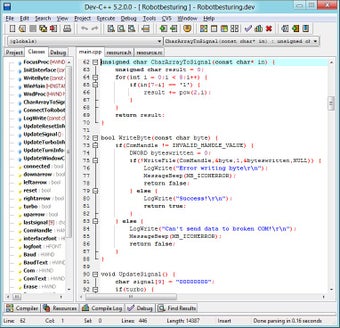
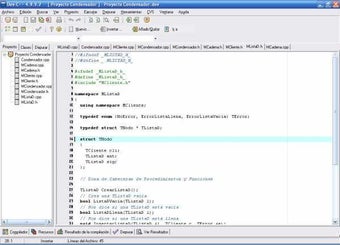
Dev-C++ is a free, open-source development and IT program that simplifies the programming process for C and C++. This program uses minimal computer resources, making it a good choice for older systems. It is an all-in-one platform that allows users to write, edit, debug, and compile code in one place.

Top Recommended Alternative
A free IDE to write and compile in C/C++

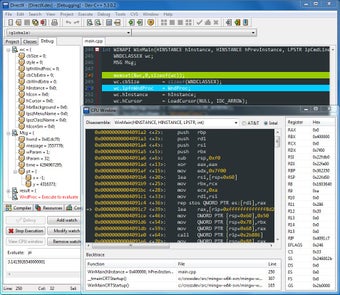
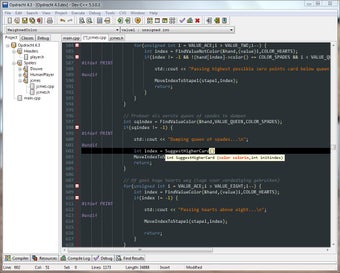
Dev-C++ includes several helpful features, like an integrated debugger that assists in checking code for errors and conflicts. Additionally, features like autocomplete and syntax highlighting help new programmers improve efficiency and reduce common typos. Its simple, streamlined setup makes programming in C/C++ easy without the complexity of more advanced IDEs.

However, Dev-C++ is a much older program; its user interface can feel clunky and dated compared to modern alternatives. A major drawback is its lack of support for Mac computers. Without a modern design or quality-of-life features, the experience can be less than ideal for users accustomed to more contemporary software.

Still, an overall helpful tool for budding programmers

Overall, Dev-C++ remains a useful tool for anyone just starting with C or C++. Despite its older design and some frustrating usability issues, its simple approach and lightweight nature make it an excellent choice for learning the fundamentals of programming. It provides all the essential tools without unnecessary clutter or complexity.


Cathy Buggs

With decades of experience in IT management and later as a writer and tutor, she combines technical knowledge with a passion for clear communication. His work spans editing, teaching, and writing, bringing authority and precision to content on technology and related fields.

  • Pros

    • Free and open-source
    • All-in-one platform for coding
    • Integrated debugger
    • Lightweight
  • Cons

    • Not available for Mac
    • Unintuitive user interface
    • Lacks modern features
 0/5

App specs

  • License

    Free

  • Version

    6.3
  • Latest update

  • Platform

    Windows

  • OS

    Windows XP

  • Language

    English

    Available languages

    • Czech
    • Danish
    • German
    • Greek
    • English
    • Spanish
    • French
    • Italian
    • Korean
    • Dutch
    • Norwegian
    • Polish
    • Portuguese
    • Russian
    • Swedish
    • Turkish
    • Chinese
  • Downloads

    4.3M

    Last month's downloads

    • 16.7K
  • Size

    73.86 MB

  • Developer

Program available in other languages


User reviews about Dev-C++

4

6 reviews

Add review

Main reviews for you

  • Anonymous user

    It is latest version. i think this is best compiler then turbo c

  • Anonymous user

    Yes i recommend it, because its a good compiler for biggners

  • Anonymous user

    As advertised it is a no frills c++ env.. I was wanting to migrate to c++ from VB6 many years ago and wound up giving up, then I got turned onto bloodshed and was able to tolerate it enough to start learning. There is none of the usual presumptive BS one would find with environments like boreland and VC++ that just end up confusing a noob, and its solid enough that even gaming code like hexen can be made to do its thing. Pros: Easy and straightforward, it's like it was made for all the c++ books and tuts. Fairly standard c syntax, and since the syntax is the most brutal thing about C/c++ for those coming from basic and foxpro traditions, this is good. Cons: ugly. If your coming into c/c++ from VB or FP its dos like ide can be a little daunting at first.

  • Anonymous user

    Free, easy, incredible.. I first started using Dev-C++ a long time ago - about 5 1/2 years ago to be exact. I still use it, especially since as a computer science major I find myself programming in C++ more than I did for leisure. It is incredible, in my opinion, that something free like this can be so feature filled and powerful. It is good for absolute beginners, and the experienced alike. Unlike Visual C++, however, there is a bit more overhead in regards to win32 API programming than in Visual C++. This doesn't exactly make it *bad* - I think it helps since it forces you to re-enforce your knowledge of how to code windows, forms, menus, etc on your own from scratch.The interface is very user friendly, all the menus are organized in a logical manner, the project windows and the like are laid out in a neat, and not really annoying fashion. You can configure any library you want with it, either manually, or using the DevPak system, which is unfortunately not supported anymore. A real shame since it saved a LOT of time and allowed me to spend less time installing the SDL libraries, for example, and actually USING said libraries.Another reviewer listed the use of an "outdated" compiler as a con. The issue with this is that you can set it up with any compiler you like, you can even get the program WITHOUT a compiler, without Dev-C++ configured to use the compiler that is packed with it usually. There is a downside though, the debugger does not work properly. There are fixes though, which means you will have to do a little work to find them / get it working right, but it isn't AS BIG an issue as some people make it seem, really.Overall, I say Dev-C++ is well rounded, powerful, and great for small and large project alike. You have to do a little more overhead in some cases, but if you are dedicated to learning C++, or coding projects - for fun or otherwise - it is worth it. Pros: - Free- Easy to set up- Can be configured to use whatever libraries you want- Support for pretty much any form of C / C++- Doesn't add unnecessary bloat to your programs/projects Cons: - Debugger doesn't work correctly out of the box

  • Anonymous user

    AVG and Dev C++ 4.9.9.2 complatibility. Hey when i installed dev c++ 4.9.9.2 everytime i compile and run my c++ program i get a warning from my AVG saying that the compiled file has a Trojan horse Generic 17.AOVR in it. anyone knows why?

  • Anonymous user

    For beginners. I've found this IDE very usefull. For all of you that are thinking to start to program in C++, and want a clean editor and an easy compiler, this is without doubt the one.It's robust, powerfull and features an exellent debugger. Pros: Easy to useGood text editorGood compilerGood debugger Cons: Let me think...

More

You may also like

Alternatives to Dev-C++

Explore Apps

Latest articles

Laws concerning the use of this software vary from country to country. We do not encourage or condone the use of this program if it is in violation of these laws.
Softonic

Is Dev-C++ safe?

100/100

Score result: Clean

This file passed a comprehensive security scan using VirusTotal technology. It is safe to download.

  • Virus free
  • Spyware free
  • Malware free
  • Verified by Security Partners

    VirusTotal logo

Scan Info

Last scan
Wednesday, February 23, 2022
Scan provider
VirusTotal · Full report

File Integrity

File
Dev_C___v6.3.zip
SHA256
6adfbe5e04877912985cb6a8f689be1082ef233c67cf2103cb50b41b55aed956
SHA1
c7cd57e7bb7a91aa339c9abd6297e240c250990d

Softonic security commitment

Dev-C++ has been thoroughly scanned by our advanced security systems and verified by industry-leading partners. This file comes from the official developer and has passed all our security checks, showing no signs of viruses, malware, or spyware. For more information, visit our Security and Trust Center